United States Passport (2x2 inch) Photo Size Requirements and Online Tool
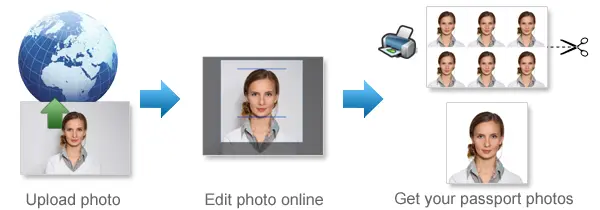
Make United States Passport Photos Online Now »
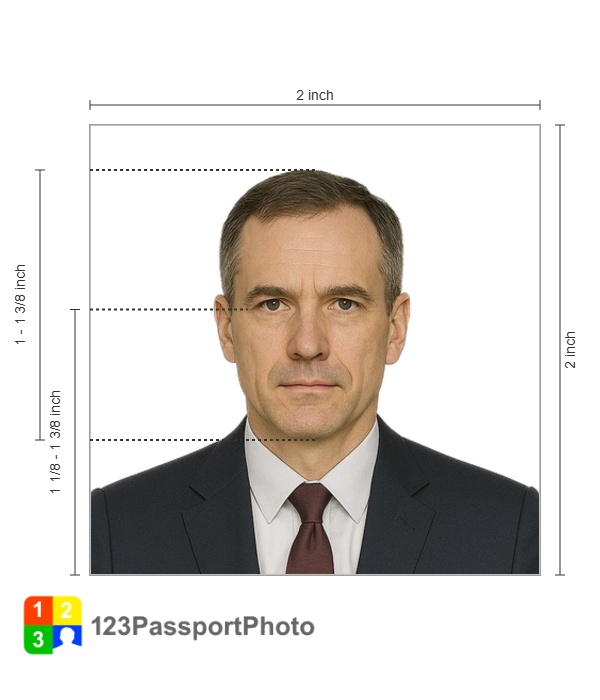
| Passport picture size | Width: 2 inch, Height: 2 inch |
| Resolution (DPI) | 600 |
| Background color | White |
| Printable photo | Yes |
| Digital photo for online submission | Yes |
| Digital photo size | Width: 1000 pixels , Height: 1000 pixels |
| Photo Paper type | matte |

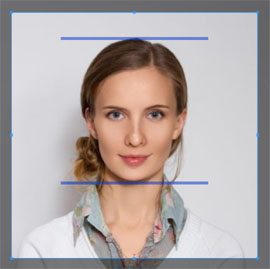
Do not worry about the photo size requirements. Our online tool makes correct photos, ensuring the photo size and head size are correct. Background will be enhanced as well.
Last Update: August 2, 2026
US Passport Photo (2X2 inch passport photo) Requirements
-
Your head must face the camera directly with your fullface in view.Your face should be centered in the frame, and your full head, from top of the hair to the bottom of the chin, should be visible.
- Use a clear image of your face. Do not use filters commonly used on social media, as they can distort the image of your face and give the impression of an unnatural expression.
Photo Recency
-
Taken in the last 6 months
Background
-
Use a plain white or off-white background
What Expression Should You Use?
-
You must have a neutral facial expression or a natural smile, with both eyes open.A neutral facial expression means that the face should be relaxed and show no discernible emotion. The lips should be closed or slightly open, without any hint of a smile or other expression. The eyes should be looking straight into the camera.
What Should You Wear?
-
Taken in clothing normally worn on a daily basis
Can You Wear Glasses?
-
You cannot wear glasses.
-
If you cannot remove your glasses for medical reasons, please include a signed note from your doctor with your application.
-
Hats and Religious Head Coverings
-
You cannot wear a hat or head covering.
-
If you wear a hat or head covering for religious purposes, submit a signed statement that verifies that the hat or head covering in your photo is part of recognized, traditional religious attire that is customarily or required to be worn continuously in public.
-
If you wear a hat or head covering for medical purposes, submit a signed doctor's statement verifying the hat or head covering in your photo is used daily for medical purposes.
-
Your full face must be visible and your hat or head covering cannot obscure your hairline or cast shadows on your face.
-
-
You cannot wear headphones or wireless hands-free devices

Choose the Right Passport Photo Format
Printed passport applications and online passport renewals do not use the same photo process.
Choose the option that matches your application.
Printed 2x2 Passport Photo
-
Dimensions
-
2 x 2 inches (51 x 51 mm)
-
Head must be between 1 -1 3/8 inches (25 - 35 mm) from the bottom of the chin to the top of the head
-
-
The photograph is printed on high-quality matte or glossy paper
-
Color-printed
Digital Passport Photo for Online Renewal
When renewing a U.S. passport online, upload the original digital image
The digital passport photo must be:
- A JPG, JPEG, PNG, HEIC or HEIF file
- Between 54 KB and 10 MB
- In color
- Taken within the last six months
- Clear, sharp and unedited
- Taken against a plain white or off-white background
Leave some space around your head and shoulders when taking the photo.
Passport Photos for Babies and Children
Babies and young children also need their own passport photo, even newborns.
For the easiest setup, lay a plain white or off-white sheet down and place the baby on it. Another simple option is to cover a car seat with a light-colored sheet and position the child there. Take the photo from directly above so the face is clearly visible.
Keep things as simple as possible:
- The child should be alone in the photo
- No hands, arms, or anyone else should appear in the frame
- The full face must be visible
- Nothing like a pacifier, toy, or hand should cover the face
- Use a plain, uncluttered background
- Avoid strong shadows on the face or background
- Make sure the image is sharp and in focus
- The child should be facing upward toward the camera
For older children, have them look toward the camera with their eyes open, just like an adult passport photo.
It usually takes a few tries to get a good shot, so take several photos. A clear, simple image where the child is visible and well-lit is more important than getting a “perfect” expression.
How Our 123passportphoto Passport Photo Maker Help to Create 2X2 inch passport photo online
Preparing the correct print size manually can be difficult. An image may look square on a screen but print at the wrong physical dimensions.
Our online passport size photo maker helps you crop and arrange the photo for printing and for online submission.
Step 1: Take a Suitable Original Photo
Follow the instructions on this page regarding the background, lighting, clothing, facial expression, and camera position.
Do not use a filtered or digitally altered photo.
Step 2: Upload Your Photo
Choose the clearest original image from your phone, camera, or computer and upload it to our passport photo maker.
Step 3: Crop the Passport Photo
The 123PassportPhoto cropping tool will help you crop and position the photo to meet the required dimensions.
Step 4: Download Your Image
Download your compliant printable template for a 2×2 photo and a digital file suitable for online submission.
How to Print a 2x2 Passport Photo at Home
You can print a passport photo at home if you have a color printer and photo paper.
Use Photo Paper
Use matte or glossy photo paper.
Avoid:
- Regular copy paper
- Black-and-white printing
- Damaged or folded sheets
- Copies or scans of photos
Print at Actual Size
Make sure print settings are set to 100% / actual size.
Do not use:
- Fit to page
- Fill page
- Scale to fit
These can change the 2x2 size.
Frequently Asked Questions
What is the correct US passport photo size?
The official printed US passport photo size is 2 x 2 inches, or 51 x 51 mm.
This is sometimes called the American passport photo size or USA passport photo size.
What Is a 2×2 Passport Photo?
A 2×2 passport photo is a square identification photograph that measures 2 inches by 2 inches, or 51 mm by 51 mm. This standard photo size is commonly required for U.S. passport applications, certain U.S. visas, and other official identification documents.
The head must be centered and measure between 1 inch and 1⅜ inches, or 25–35 mm, from the bottom of the chin to the top of the head. The photo should clearly show the applicant’s full face and upper shoulders.
What are the current US passport photo requirements?
A printed U.S. passport photo must be a recent color image measuring exactly 2 x 2 inches. It must have a plain white or off-white background and show you facing the camera with your eyes open and full face visible.
Your head must measure between 1 and 1⅜ inches from the bottom of your chin to the top of your head.
How to get or make a 2×2 passport photo?
There are two common options:
- Visit a photo studio, pharmacy, post office, or retail store that provides passport photo services.
- Take the photo yourself with a phone or camera, crop it to 2×2 inches, and print it.
Can I use an online 2x2 photo maker?
You may use an online 2x2 photo maker to crop, position and prepare a printable layout.
The original photo must still meet the official requirements for background, lighting, expression, clothing and image quality.
Do not use a tool that changes your appearance.
Can I take my passport photo at home?
Yes. You can take a passport photo at home with a smartphone or digital camera.
Use a real white or off-white background, even lighting and a camera positioned several feet away at face level. Asking another person to take the photo is usually better than taking a selfie.
Can I create a passport photo online?
You can upload a suitable original photograph to an online passport photo maker and prepare it for printing.
Review the final image carefully. A cropping tool cannot correct an unacceptable pose, expression, background or edited appearance.
How many pixels should a passport photo be?
For a printed passport application, the official requirement is based on physical size rather than one required pixel dimension. The finished print must measure 2 x 2 inches.
The current online passport-renewal guidance lists accepted file formats and a file-size range but does not publish one fixed passport photo pixel size.
Use a clear, high-resolution original image and avoid resizing it to an arbitrary pixel dimension.
What is the digital passport photo file size?
For an online U.S. passport renewal, the digital photo file should be between 54 KB and 10 MB.
Accepted formats currently include JPG, JPEG, PNG, HEIC and HEIF.
Does a digital passport photo need to be 2x2 inches?
The 2x2-inch measurement applies to a printed passport photo.
For online renewal, upload the original digital image and follow the digital file, background, pose and quality requirements. The official application allows you to reposition or crop the photo during upload.
How to take a free 2×2 passport photo with an iPhone?
You can use the standard iPhone Camera app:
- Turn off Portrait mode, filters, and appearance-enhancement features.
- Use the rear camera for better image quality.
- Ask another person to take the photo.
- Stand in front of a plain white or off-white background.
- Keep the phone at eye level.
- Leave enough space around your head and shoulders for cropping.
- Crop the image into a square and size it to 2×2 inches.
How do I take a 2×2 passport photo on Android?
The process is similar to taking one with an iPhone:
Use the rear camera at the highest available quality. Turn off beauty mode, filters, Portrait mode, background blur, and other enhancement features.
Stand in front of a plain white or off-white background and face the camera directly. Make sure the face is evenly lit and both eyes are clearly visible.
After taking the photo, use 123passportphoto.com passport photo cropping tool to crop the image into a square and size it to 2×2 inches.
Do not digitally replace the background or alter the person’s appearance.
What color shirt should I wear?
There is no required shirt color.
A medium or dark top may provide clear contrast against the white or off-white background. Do not wear a uniform, camouflage or clothing that covers part of your face.
Can I print a 2x2 passport photo at home?
Yes, provided your printer produces clear color photographs and you use photo-quality paper.
Print the layout at its intended size and measure the finished photo to confirm that it is exactly 2 x 2 inches.
Is an online passport photo maker an alternative to a passport photo near me?
An online passport photo maker can be a convenient alternative when you can take a suitable original photo and have access to a reliable photo printer or local printing service.
Source: https://travel.state.gov/en/passports/apply/help/photos.html
For other U.S. document photo requirements, please check the links below:
United States DV lottery 2x2 inch (51x51 mm, 5.1x5.1 cm)
United States Green card 2x2 inch (51x51 mm, 5.1x5.1 cm)
United States Visa 2x2 inch (51x51 mm, 5.1x5.1 cm)
United States NY MTA Metrocard for Seniors 1.5x2 inch
United States NY Gun License 1.5x1.5 inch
If you want to make passport/visa photos for other countries, click the button below.
Make Passport/Visa Photo for Other Countries
How to make United States Passport photo online
Step 1: Take a picture with a digital camera or a smartphone
Make sure someone takes your passport photo for you. Selfies are not accepted. Make use of your tripod if you have one. By using a tripod, you will be able to keep the camera level and steady. Ideally, the person should be around 1 meter away from the camera.
Step 2: Choose a venue with appropriate lighting
Face a bright window or the door when taking a photo. In this way, shadows can be avoided on the face and in the background. It is essential that the face is evenly lit. Ensure that the face is free of shadows and glares.
Note: You do not need to worry about the background, since our online passport photo generator will automatically do it for you.
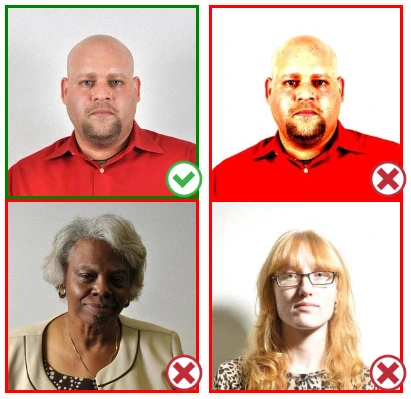
Step 3: Dress appropriately for your passport photo
Uniforms should not be worn. Put on regular street clothes for your photo.
Eyeglasses should not be worn. You should remove any sunglasses, tinted glasses, or glasses that you wear if you are taking a passport photo.
Ensure that your face is fully visible. Make sure your hair doesn't cover your face or obscure your eyes. In the case of very long bangs covering your eyebrows, pin them back with bobby pins. Although it's better to show your ears as well, that won't stop your photo from being accepted.
Passport photos don't allow hats unless they're religious headgear such as a headscarf or yarmulke.
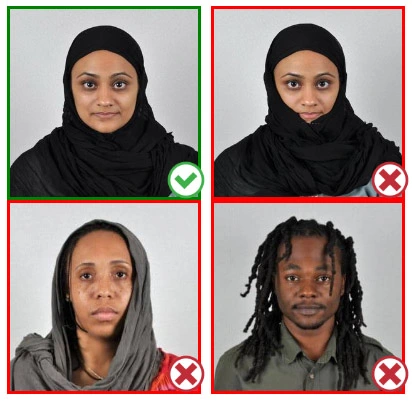
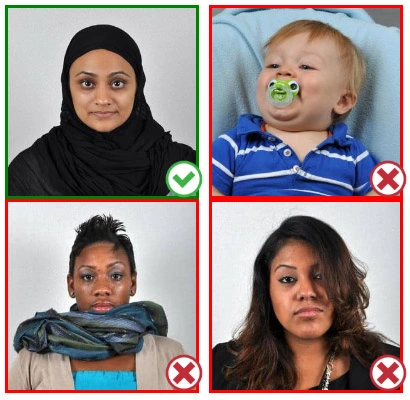
Step 4: Pose for a passport photo
Face the camera straight on and look straight at it. Avoid tilting or rotating the head.
It is important that the shoulders are visible, and there should be enough space around the head to crop the picture.
Make sure the camera is at the same level as the head.
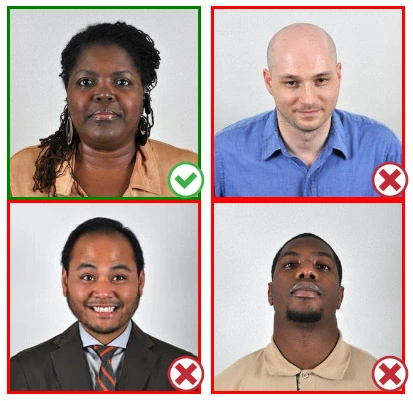
Step 5: Maintain neutral facial expressions
The government prefers you to have a neutral facial expression.
Under the new international passport rules, it is usually not acceptable to smile or have your mouth open.
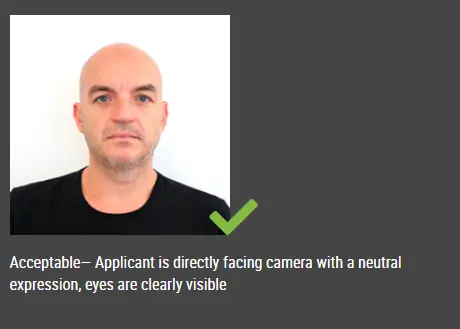
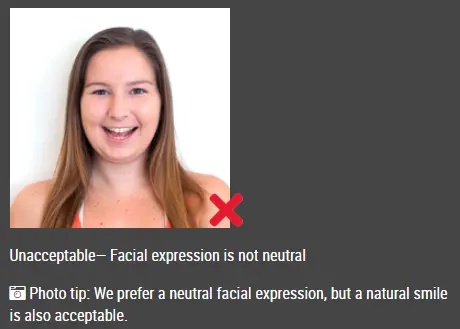
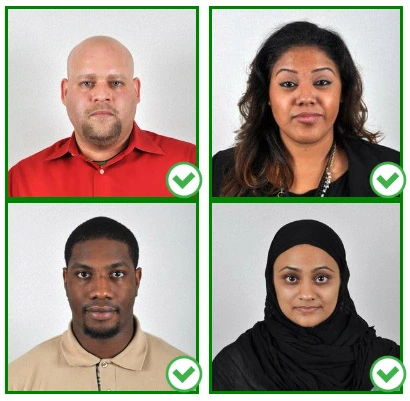
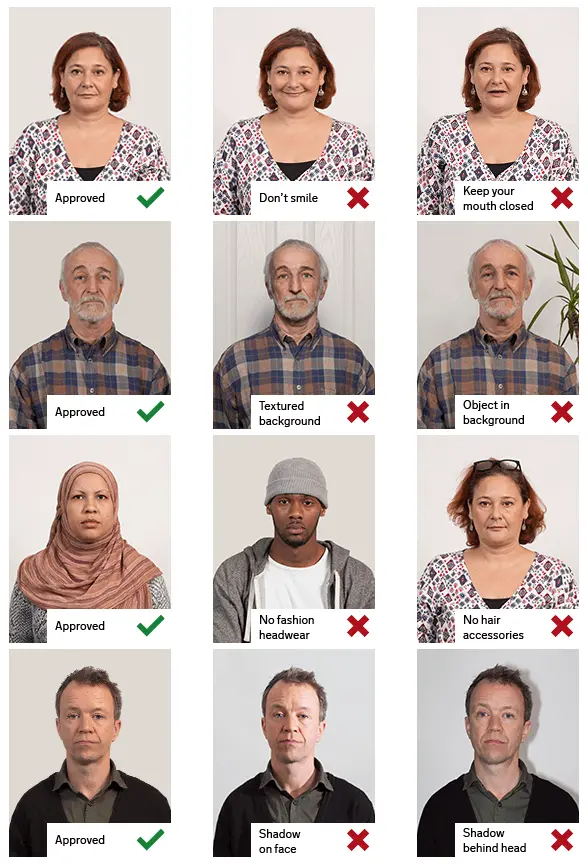
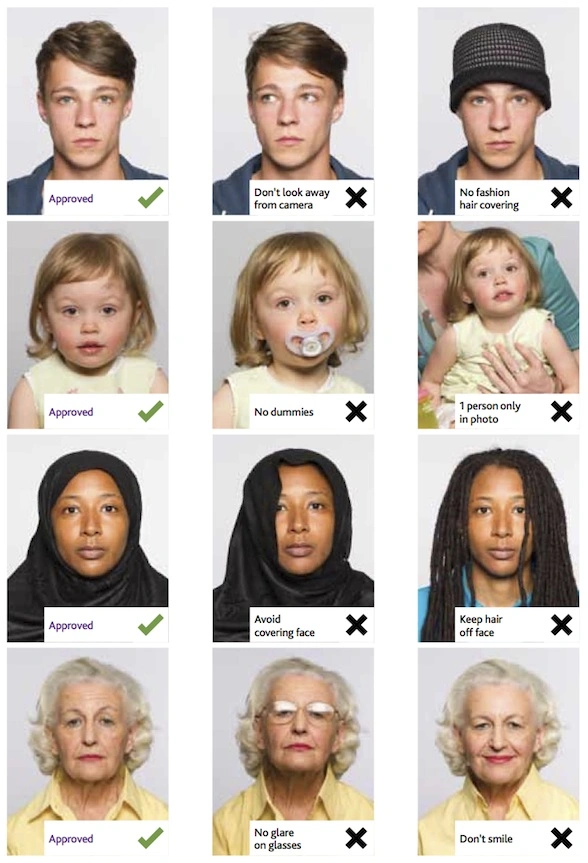
Good and bad examples of passport photos
This document is rated 4.2 / 5 - 10 Votes